 heala
healaStop Juggling Apps: Barcode Food Logging That Syncs With Your Wearable
Stop Juggling Apps: Barcode Food Logging That Syncs With Your Wearable
Barcode scanning is the quickest practical way to log packaged food, and it deserves a permanent place in your routine rather than the odd shortcut. The catch is that scanning alone doesn’t guarantee accuracy. Always check the serving size, calorie figure, and any allergen flag the app pulls through before saving it, and if the entry looks off or missing, weigh the item and save your own custom version instead.
TL;DR:
- Barcode databases vary in reliability, with crowd-sourced options like Open Food Facts offering extensive coverage but inconsistent data accuracy.
- When a barcode fails to match or returns outdated information, OCR label scanning provides a useful fallback, especially for regional or new products.
- Manual weight measurement and editing entries are essential for precise macros, as packaged labels include a legal margin of error, not exact figures.
- Apps that support editing, custom entries, and photo logging improve accuracy, but fresh and unpackaged foods still require manual input or fixed custom recipes.
- Pairing barcode scanning with wearable data integration enhances tracking consistency, especially for athletes and those monitoring recovery or activity levels.
Table of Contents
- Quick checklist: set up, scan, verify, save
- How barcode scanning works: lookups, databases and OCR fallback
- Choosing an app: the features that matter for accuracy and speed
- Accuracy limits and how to correct entries
- Privacy and syncing: what permissions and integrations to check
- Specialist tips: allergies and athlete-focused logging workflows
- Heala and the author: how we handle barcode logging and label uncertainty
- Barcode scanning versus manual logging: which is actually more accurate?
- Comparing barcode scanner apps: usability against database size
- How reliable are barcode databases, and how often are they updated?
- Do barcode scanners work on products bought abroad?
- Where barcode logging breaks down: fresh and unpackaged food
- Author perspective: small daily habits that keep logging useful
- Try Heala: barcode logging plus wearable synchrony
- Sources
- FAQ
Quick checklist: set up, scan, verify, save
Before your first scan, spend two minutes on setup. It saves you correcting the same mistakes for weeks afterwards.
- Grant camera access and, if you want your food data alongside training and sleep, connect your health sync (Apple Health, Google Health Connect, Fitbit).
- Set your default units for serving size and portion in the app’s settings, so every new scan lands in grams or household measures the way you actually eat.
- Scan the barcode, then pause before saving. Check the calorie figure, serving size, and any allergen tag against the actual packaging.
- Fix what’s wrong. If a field is missing or clearly incorrect, edit it or save the item as a custom food so you never hit the same error twice.
- Reuse saved entries for anything you buy repeatedly. This is where barcode logging actually starts saving you time, not just at the point of scanning.
That fourth step is the one most people skip, and it’s the one that determines whether your log gets more accurate over time or stays wrong indefinitely.
How barcode scanning works: lookups, databases and OCR fallback
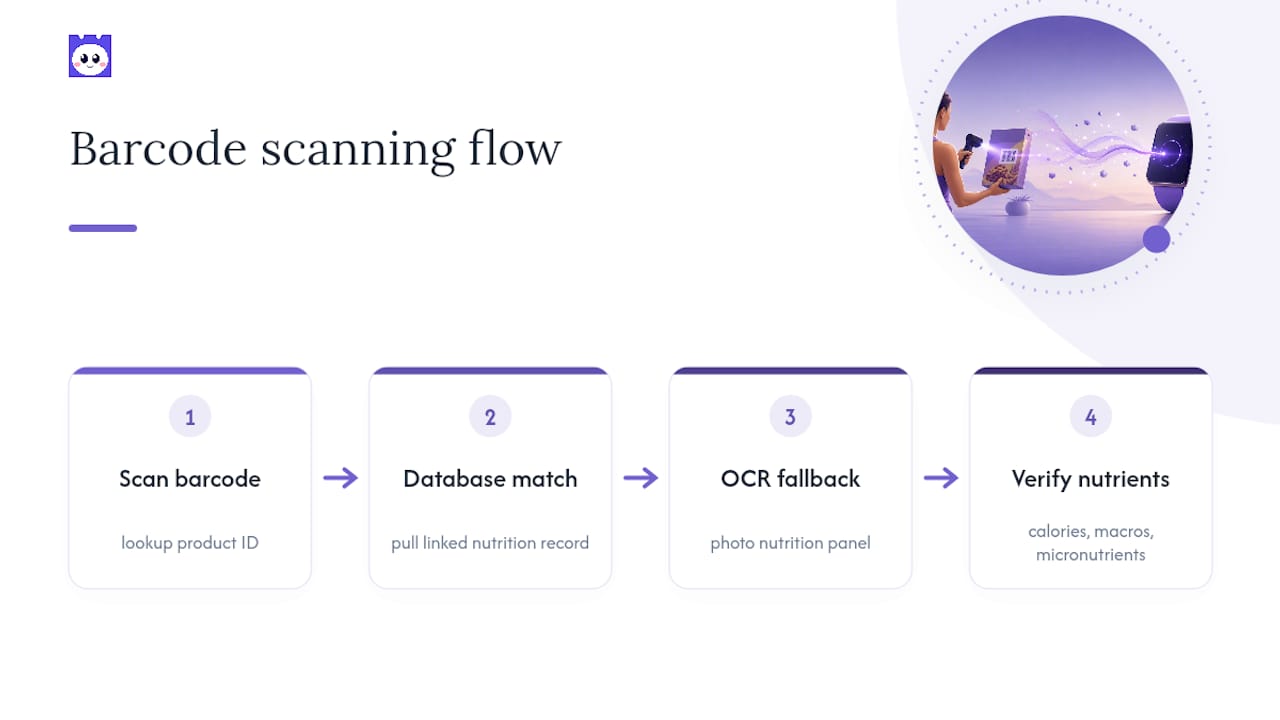
A barcode itself carries no nutrition information. It’s a product identifier that the app matches against a database, then pulls the nutrition record linked to that code. Some apps rely on crowd-sourced databases like Open Food Facts, which cover a huge range of products because anyone can add one, but that breadth comes with inconsistent verification. Other apps use tighter, vendor-fed catalogues that trade breadth for cleaner data.
When a barcode doesn’t return a match, the better apps fall back to OCR label scanning: photographing the printed nutrition panel and reading the numbers directly off it rather than relying on a database entry at all. This is a genuinely useful fallback for smaller or regional products that never made it into any barcode index. Worth noting too: apps vary a lot in how deep they go. Most nail calories and macros; far fewer populate micronutrients like iron or B12 with any reliability.
Choosing an app: the features that matter for accuracy and speed
Don’t judge a barcode scanner food app purely on how fast it scans. Speed is easy. Getting a correct, editable record is the harder problem, and it’s the one that actually affects your numbers.
Look for these before you commit to one app for the long haul:
- Editable entries and custom food saving — you’ll need this constantly, not occasionally.
- OCR or label-scan capability for anything without a clean barcode match, plus photo logging for meals you cook or buy loose.
- Nutrient depth that matches your goals — casual calorie tracking needs less detail than athletes managing precise protein and carbohydrate targets.
- Sync options with Apple Health, Google Health Connect, or Fitbit, and a clear privacy setting for what gets shared and stored.
Pro Tip: Test any new scanner food app on five products you already know well, like your usual bread, milk, and protein powder, before trusting it with a full week of logging. If it gets those wrong, it’ll get everything else wrong too.
Accuracy limits and how to correct entries
Packaged calorie labels aren’t as exact as they look on the pack. Research on label accuracy shows manufacturers are legally permitted a margin of error on the calorie figure, meaning the number on the box is a close estimate rather than a lab-verified constant. That’s fine for casual tracking. It matters more if you’re cutting weight on a tight deficit or chasing precise macros.
Statistic Callout: Packaged calorie labels can legally sit within a set margin of the true value, according to findings on calorie label accuracy. Treat any single scanned entry as an estimate, not a lab result.
Ways to tighten this up:
- Weigh anything where precision matters, rather than trusting the “per serving” figure on the label.
- Edit the nutrient fields once you’ve weighed a product, and save it as a corrected custom entry.
- Watch for patterns. If your weight trend consistently drifts against what your log predicts, you’re likely under-logging somewhere systematic, not randomly.
Privacy and syncing: what permissions and integrations to check
Camera access is the only permission most barcode scanning food apps genuinely need to function. Health data access is optional and only matters if you want scanned meals sitting alongside your training and sleep data in one place.
Wearable sync changes what your calorie budget actually means day to day. A Fitbit or Apple Watch feed can adjust your target based on real activity rather than a fixed estimate, so a heavy training day nudges your intake target up automatically. Before you connect anything, check whether the app lets you export or delete your scan history, and whether it shares data with third parties beyond what you’d expect from a food log. Pairing barcode entries with sleep and activity metrics gives you a fuller read on why a week felt harder or easier than the numbers alone suggest.
Specialist tips: allergies and athlete-focused logging workflows
Barcode scanning is a genuinely useful first check for allergens. It surfaces ingredient and allergen flags fast, which cuts down on manual label-reading mistakes. But it should never be your only check for a high-risk allergy. Databases can be outdated or incomplete, so confirm the physical ingredient list on anything that matters medically.
For athletes chasing precise macros, prioritise entries with a full breakdown rather than calories alone, and lean on photo or OCR logging for meals that never came with a barcode.
- Batch-scan your groceries once a week so staple items are already saved as custom entries before you need them.
- Pre-tag training-day meals so you can spot fuelling patterns without re-entering the same foods.
- Reuse saved custom entries for anything eaten more than once. This is faster and more accurate than rescanning.
Pro Tip: If you eat out somewhere with a fixed menu, save that meal as a custom entry after your first visit. It won’t have a barcode, but it’ll save you retyping it every time you go back.
Heala and the author: how we handle barcode logging and label uncertainty
This piece draws on research into food-logging accuracy, including work on why restaurant portions often diverge from menu calorie figures. Heala’s barcode scanner sits alongside photo logging and wearable sync, so a scanned meal shows up next to your training and recovery data rather than in isolation.
The practical workflow Heala encourages is the same one this article has walked through: scan, verify the figures against the pack, weigh when precision matters, and save a corrected custom entry so the fix sticks for next time.
Barcode scanning versus manual logging: which is actually more accurate?
Manual logging depends entirely on your memory of portion size and your patience for searching a database by name, both of which degrade the moment you’re tired, rushed, or eating something unfamiliar. Barcode scanning removes the search step and pulls a manufacturer-verified serving size straight from the record, which is where most of its accuracy advantage over manual entry actually comes from.
The gap shows up most clearly in consistency over time. Someone typing “granola” into a search bar might land on five different generic entries across a month, each with slightly different calorie counts. Someone scanning the same box of granola gets the same record every time, assuming the database entry itself is correct. That consistency is arguably more valuable for weight or macro tracking than raw precision on any single day, because trend accuracy matters more than one perfect entry.
Where manual logging still wins is flexibility. A home-cooked stew, a handful of nuts from a shared bowl, or a restaurant dish with no visible packaging all defeat barcode scanning outright, and manual entry (or a weighed custom food) is the only route to a usable number. The most reliable trackers don’t pick one method. They scan when a barcode exists, weigh and log manually when it doesn’t, and correct database entries when they’re visibly wrong. Treating barcode scanning as the default for packaged food and manual entry as the necessary backup for everything else gets you closer to an accurate week than relying on either method alone.
Comparing barcode scanner apps: usability against database size
The trade-off across barcode scanner food apps almost always comes down to breadth versus verification, and it’s worth understanding before you settle on one for the long term.
Crowd-sourced options like Open Food Facts cover an enormous range of products, including regional and niche items that vendor-fed databases often miss entirely, because any user can add a missing record. The trade-off is variable data quality. A product added by one contributor might have an accurate calorie count and a vague or missing allergen list, simply because whoever logged it didn’t fill in every field.
Apps built on tighter, vendor-supplied catalogues tend to have fewer total products but higher confidence in the numbers that are there, since the data usually comes from the manufacturer rather than a public contributor. The usability difference is often subtle rather than dramatic: a database with cleaner entries means fewer scans returning “not found” or obviously wrong figures, which matters more for daily consistency than raw product count.
For most people, the practical answer isn’t picking one type over the other. It’s picking an app that handles a miss gracefully, whether through OCR label scanning, a fast custom-food creation flow, or both, so a database gap costs you thirty seconds rather than derailing the whole log. Database size looks impressive in an app store listing, but what actually determines whether you keep using the app is how little friction there is when a scan comes back empty.
How reliable are barcode databases, and how often are they updated?
Barcode databases are living systems, not static archives, and their reliability depends heavily on who’s maintaining them and how often.
Crowd-sourced databases like Open Food Facts update constantly because contributors add and correct records in real time, which means popular products tend to get fixed quickly while obscure ones can sit with outdated or incomplete data for a long time. Vendor-fed databases update on a slower, more structured cycle tied to manufacturer submissions, which usually means fewer errors but a longer lag when a product’s recipe or packaging changes.
Either way, reformulation is the quiet problem nobody talks about enough. Manufacturers change recipes, portion sizes, and packaging regularly, sometimes without much fanfare, and a barcode record that was accurate a year ago can now be pointing to nutrition figures that no longer match what’s on the shelf. This is one of the strongest arguments for treating any scanned entry, however established the database, as a checkpoint rather than gospel. If a product looks or tastes different from how you remember it, check the label against the app’s figures before you trust the scan blindly.
The practical takeaway: databases with active contributor communities or frequent vendor updates are more reliable in aggregate, but no barcode database is immune to lag. Building the habit of a quick visual check against the actual packaging costs seconds and catches the cases where the database hasn’t caught up yet.
Do barcode scanners work on products bought abroad?
Regional and international barcodes can be a genuine gap in barcode food logging, and it’s worth knowing before you’re standing in a foreign supermarket wondering why nothing scans.
Most global barcode standards (EAN, UPC) are recognised internationally, so a product’s barcode itself will usually scan without error. The problem is database coverage, not the barcode format. A product common in one country might be entirely absent from a database that’s mostly populated by contributors or vendor feeds in another region, which means a barcode that scans perfectly well returns no nutrition data at all.
Open, collaborative databases tend to handle this better than closed vendor catalogues, purely because of scale. A global community of contributors on something like Open Food Facts is more likely to have added a regional product than a database that only ingests manufacturer submissions from a handful of markets. Even so, gaps remain common for smaller local brands, regional variants of larger products, and anything sold under a different name across borders.
When a scan comes back empty on holiday or after ordering something internationally, your fastest fix is usually OCR label scanning if the app supports it, since it reads the printed panel directly rather than depending on the product being indexed anywhere. Failing that, add the product manually using the figures on the pack and save it as a custom entry. It’s a small bit of manual work, but it also means the next traveller scanning that same product, on whichever app pulls from the same open database, benefits from the entry you just created.
Where barcode logging breaks down: fresh and unpackaged food
Barcode scanning has a hard limit, and it’s one worth being upfront about rather than discovering mid-log: it only works on products that come with a barcode in the first place. Fresh produce, meat from a butcher’s counter, bakery items, and anything served in a restaurant simply don’t have one to scan.
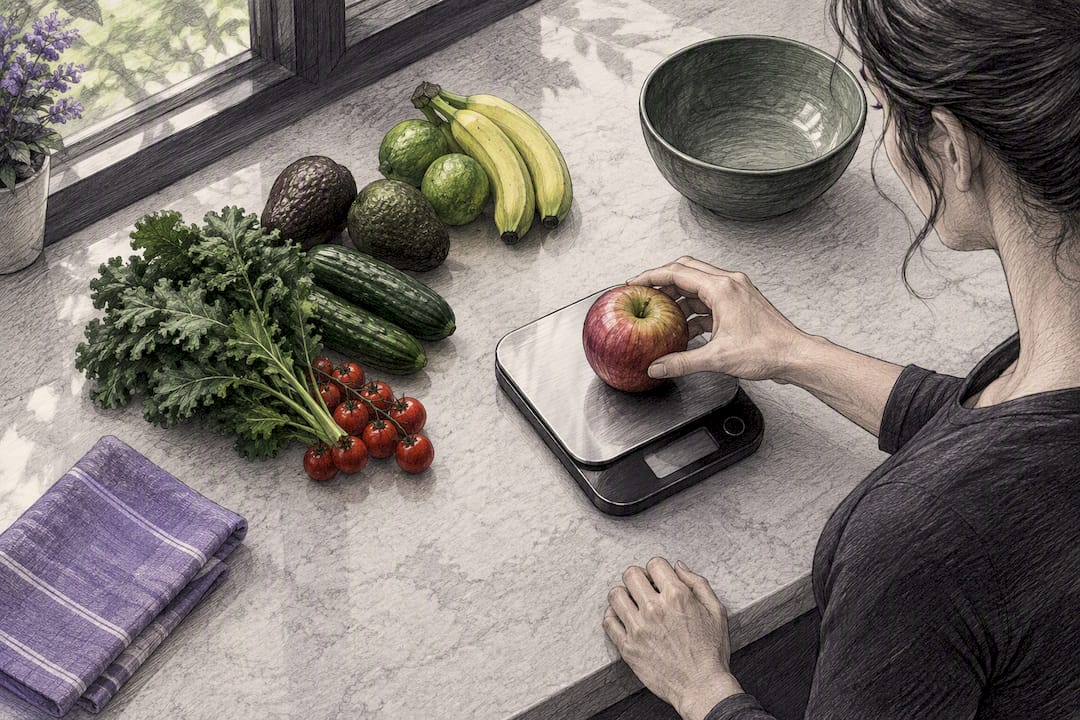
This is where the method’s speed advantage disappears entirely. A loose apple, a portion of grilled chicken, or a slice of homemade cake all require manual entry, a weighed custom food, or a photo-logged estimate, and none of those are as fast or as consistent as pulling up a verified barcode record. For people eating mostly whole, unpackaged foods, day to day, barcode scanning ends up covering a smaller share of the log than it would for someone eating mostly packaged snacks and ready meals.
The practical fix isn’t to abandon barcode scanning; it’s to stop expecting it to do a job it was never built for. Build a small library of custom entries for the fresh foods you eat most often, weighed once and saved for reuse, so the manual effort only happens the first time. Photo logging can help bridge the gap for genuinely variable meals, like a stir-fry with a different mix of vegetables each time, where no fixed custom entry would ever be quite right. Barcode scanning earns its place as the default for anything with packaging. Everything else still needs a human doing the measuring, at least once.
Author perspective: small daily habits that keep logging useful
Scan at the point of use, fix obvious errors immediately, and favour consistency over chasing perfect precision. Most people get better results from simple daily logging habits than from occasionally hyper-accurate ones.
— Kerem
Try Heala: barcode logging plus wearable synchrony
Heala is the alternative to juggling three separate apps for food, training, and recovery. Barcode scanning and photo logging sit in the same place as your Fitbit or WHOOP data, so a scanned meal automatically informs your calorie budget alongside real training load and recovery status, rather than sitting in a food log that never talks to anything else.
That’s the practical difference from stitching together a standalone scanner app, a separate training log, and a wearable’s own dashboard. One log feeds all of it. Heala’s barcode scanner feature works exactly the way this article has described: scan, verify, correct if needed, and the corrected entry stays saved for next time. There’s a free tier to start with, and Pro plans are available as monthly or annual subscriptions, with prices varying to suit different user needs. unlock deeper analytics and unlimited history if you want more from the data you’re already logging. Have a look at the pricing page and see which tier fits how you actually eat and train.
Sources
This article is general information, not a substitute for advice from a qualified doctor. Consult a qualified healthcare professional about your own circumstances before acting on anything here.
FAQ
Which free food logging app offers a barcode scanner?
Several free apps include barcode scanning, including the NHS Food Scanner app, which is free and focused on healthier swaps and traffic-light labels. Heala also offers barcode scanning on its free tier, alongside photo logging and basic wearable sync.
Is there a free app that can scan for processed foods?
Yes. Open Food Facts is a free, open database that flags processing level through its NOVA classification alongside Nutri-Score, and it’s accessible through its own scanner app or via apps that pull from its data. It relies on contributor submissions, so coverage is strongest for widely sold products.
What is the best free food tracking app in the UK?
There’s no single official “best” app, but the NHS Food Scanner app is a solid free starting point built specifically around UK products and healthier-swap guidance. For readers who also want training and recovery data in one place, Heala’s free tier adds barcode scanning without needing a separate app for wearable sync.
How accurate are barcode-scanned calorie counts?
Scanned figures come straight from the manufacturer’s label, and packaged calorie labels are legally permitted a margin of error rather than being lab-exact, according to Research on label accuracy. For most tracking purposes that’s accurate enough, but weighing and saving a corrected custom entry closes the gap for anyone counting precise macros.
What should I do if a product isn’t in the database?
Try OCR or label-scan mode first if your app supports it, since it reads the printed nutrition panel directly rather than depending on a database match. If that’s not available, weigh the item, enter the figures from the pack manually, and save it as a custom food so you never have to redo the work.
Recommended
Heala opens 1 October 2026
Free forever — Pro is optional.
Photo food logging, adaptive training, a morning recovery score and a 3D body twin, in one app.