 heala
healaShip Apple Health Integrations Without a Cloud API for Developers

Ship Apple Health Integrations Without a Cloud API for Developers
HealthKit is on-device only, with no public cloud REST API, so the pragmatic architecture is a native iOS component that reads permitted data types locally and syncs normalised payloads to your backend. You request per-data-type permission, design for revocation from day one, and reserve FHIR mapping for clinical or enterprise workflows rather than treating it as a default requirement.
TL;DR:
- HealthKit only runs on iOS, watchOS, and visionOS devices, requiring a native app to read data locally and push normalized payloads to the backend.
- The framework lacks a cloud REST API, so server-side queries and background syncs are impossible without a companion iOS app.
- Focus on a handful of key data types such as steps, heart rate, sleep, and blood oxygen, avoiding broad permission requests that lead to user drop-off.
- Properly handle user permission revocations by checking authorization status before each read and designing partial data UI states; never assume ongoing access.
- Build your integration by registering App Store permissions, normalizing data at ingestion, and implementing TLS-secured, device-scoped sync layers before production release.
Table of Contents
- What is HealthKit and where does it work?
- Which HealthKit data types actually matter for your integration?
- How should you architect Apple Health data ingestion?
- What entitlements and permissions does HealthKit require?
- How do you handle privacy and revoked permissions gracefully?
- How do you ship an Apple Health integration to production?
- Publisher perspective: lessons from Heala’s Apple Health integration
- What developers get wrong about Apple Health integrations
- Skip the boilerplate: how Heala handles Apple Health for you
- Sources
- FAQ
What is HealthKit and where does it work?
HealthKit runs on iOS 8.0 and later, watchOS 2.0 and later, and visionOS 1.0 and later, with HKHealthStore as the single access point for every read and write operation, according to Apple’s HealthKit documentation. macOS support arrives only through Catalyst-wrapped iOS apps, not as a native framework.
That platform scope creates one constraint that trips up a lot of teams building for Apple Health integrations: there is no cloud-facing REST endpoint. You cannot query a user’s steps or heart rate from a server. If your product is web-only, or you were planning a serverless ingestion pipeline, you need a companion iOS app in the loop. Full stop.
A few practical consequences follow from this:
- Web dashboards must receive data secondhand, via your own backend, never directly from Apple.
- Background jobs and iron-triggered syncs cannot pull HealthKit data; only a live iOS process can.
- Clinical Health Records (via FHIR) require a different, heavier permission path than standard fitness metrics, and should only be requested when you genuinely need medical-grade records rather than workout summaries.
Which HealthKit data types actually matter for your integration?
Most integrations only need a handful of data types, not the full catalogue Apple exposes; understanding how smartwatches improve fitness tracking & health can guide your selection. The common set covers steps, workouts, heart rate, heart rate variability (HRV), sleep analysis, blood oxygen (SpO2), and active/resting calories.
Clinical Health Records sit in a separate tier. They require additional entitlements beyond standard read/write permissions, and Apple’s Health Records sharing flow uses SMART on FHIR with end-to-end encryption, meaning Apple itself never holds the decryption keys when data moves to a provider, per Apple’s clinical sharing documentation.
Mapping guidance worth internalising before you write a line of sync code:
- Normalise units at ingestion (metric vs imperial, calories vs kilojoules) rather than downstream.
- Preserve original sample timestamps and device timezone metadata; HealthKit samples arrive with their own timezone context, which backend logic often discards by mistake.
- Deduplicate aggressively. Multiple sources (Apple Watch, a connected scale, a manual entry) can write overlapping samples for the same metric and window.
Statistic to note: Apple documents that HealthKit access has existed since iOS 8.0, which means the framework predates most consumer wearable APIs still in production today, giving it an unusually mature and stable permission model to build against.
How should you architect Apple Health data ingestion?
The realistic choice set is narrower than most teams assume, because HealthKit’s on-device constraint rules out several architectures that work fine for other health platforms.
- Native read plus secure push (recommended default). An iOS component reads
HKHealthStore, normalises the payload, and pushes it to your backend over TLS. This is the pattern most third-party SDKs implement, precisely because Apple exposes HealthKit only on-device, leaving no alternative entry point. - SDK adapter versus custom
HKHealthStorecode. An adapter saves engineering time on boilerplate (query construction, unit conversion, background delivery wiring) but adds a dependency you don’t control. Custom code gives full visibility into query behaviour, which matters more once you’re debugging edge cases like duplicate sources or timezone drift. - Companion app handshake for web-only products. If your core product is a web or Android app, ship a thin iOS companion whose only job is reading HealthKit and forwarding data to your existing backend, authenticated against the same user account.
- Normalisation layer across sources. Build a schema that treats Apple Health, Google Health Connect, and wearable APIs (Fitbit, WHOOP, Oura) as interchangeable inputs mapped to the same internal fields, rather than writing separate downstream logic for each source.
Pro Tip: Build your normalisation schema before you write your first HealthKit query. Retrofitting a unified data model after you’ve already hardcoded Apple-specific field names is far more expensive than designing for multi-source ingestion from the start.
What entitlements and permissions does HealthKit require?
Four concrete steps stand between a fresh Xcode project and a working HealthKit integration, and skipping any of them means App Store rejection or a runtime crash.
- Add the HealthKit capability in Xcode’s Signing & Capabilities tab, and enable the matching entitlement, a prerequisite Apple’s configuration documentation treats as non-negotiable before any
HKHealthStorecall will succeed. - Add
NSHealthShareUsageDescriptionandNSHealthUpdateUsageDescriptiontoInfo.plist, worded plainly for every data type you request; vague or generic strings are a common App Store review rejection reason. - Enable Background Delivery and register
HKObserverQueryobservers so your app receives updates without the user manually reopening it. Observer queries only fire while your app is running, so pairing them with Background Delivery is what actually gets you notifications when the app is backgrounded. - Write App Store review notes explaining, in plain terms, why each permission exists. Reviewers reject apps that request broad health access with no visible feature justifying it.
Clinical records need extra entitlements on top of the standard set, so budget separate review time if your integration touches FHIR-based Health Records.
How do you handle privacy and revoked permissions gracefully?
Health data is encrypted on-device, and Apple’s own privacy documentation is explicit that users can audit, limit, or revoke access at any time, for any app, without warning your backend first. Treat that as an architectural constraint, not an edge case you’ll get to later.
Users also control per-category sharing and can reorder data source priority in the Health app itself, meaning the “primary” source for a given metric can shift after launch if a user connects a new device or app.
Practical guidance for resilient design:
- Check authorization status before every read; never assume yesterday’s granted permission still holds today.
- Design UI states for partial data (some types granted, others denied) rather than an all-or-nothing dashboard.
- Use TLS for every transport leg, scope authentication tokens to the device, and never persist raw HealthKit samples unencrypted on your servers.
- For clinical data crossing into provider systems, budget for end-to-end encryption and confirm your legal obligations around health data transmission before shipping.
Pro Tip: Log a permission-state timestamp alongside every synced sample. When a user revokes access three weeks after granting it, you need to know exactly which records were captured under valid consent, especially for anything touching clinical workflows.
How do you ship an Apple Health integration to production?
- Register or confirm your Apple Developer account and provisioning profile before writing integration code.
- Enable the HealthKit capability and entitlement in Xcode, adding the clinical records entitlement only if your product genuinely needs FHIR data.
- Select the smallest data type set that supports your actual feature, and write clear, specific purpose strings for each one.
- Implement
HKHealthStorereads, registerHKObserverQueryobservers, and enable Background Delivery so sync happens without manual app opens. - Normalise incoming samples (units, timezones, deduplication) and map them either to your own backend schema or to FHIR resources if clinical interoperability is in scope; log every write for audit purposes.
- Build the secure sync layer over TLS with device-scoped authentication tokens.
- Test on physical devices, not just the simulator, since HealthKit behaves inconsistently in simulated environments; build fallback UX for partial or revoked permissions.
- Draft App Store review notes justifying each permission before submission, not the night before your deadline.
Publisher perspective: lessons from Heala’s Apple Health integration
Some engineering choices lean on a principle Apple itself signals: focus on a high-value subset of metrics rather than requesting everything HealthKit offers. Fewer permission prompts mean fewer users bouncing off onboarding.
Background sync across multiple device sources runs through a shared normalisation layer, so downstream features never branch on which wearable a workout came from. Privacy constraints, particularly around revocable access, shaped that architecture directly. Data resilience wasn’t an afterthought bolted onto the sync layer. It was a design input from the first schema decision.

What developers get wrong about Apple Health integrations
The conventional advice on this topic tends to treat HealthKit like any other third-party API: read the docs, build the client, ship it. That framing misses the part that actually determines whether your integration survives contact with real users.
Permission revocation isn’t a rare edge case you handle with a try/catch block. It’s a routine event, and Apple’s own data-sharing controls make it trivially easy for users to change their minds mid-session. Teams that treat authorization status as a one-time check at onboarding end up with silent data gaps six months later and no clean way to explain them to users or support teams.
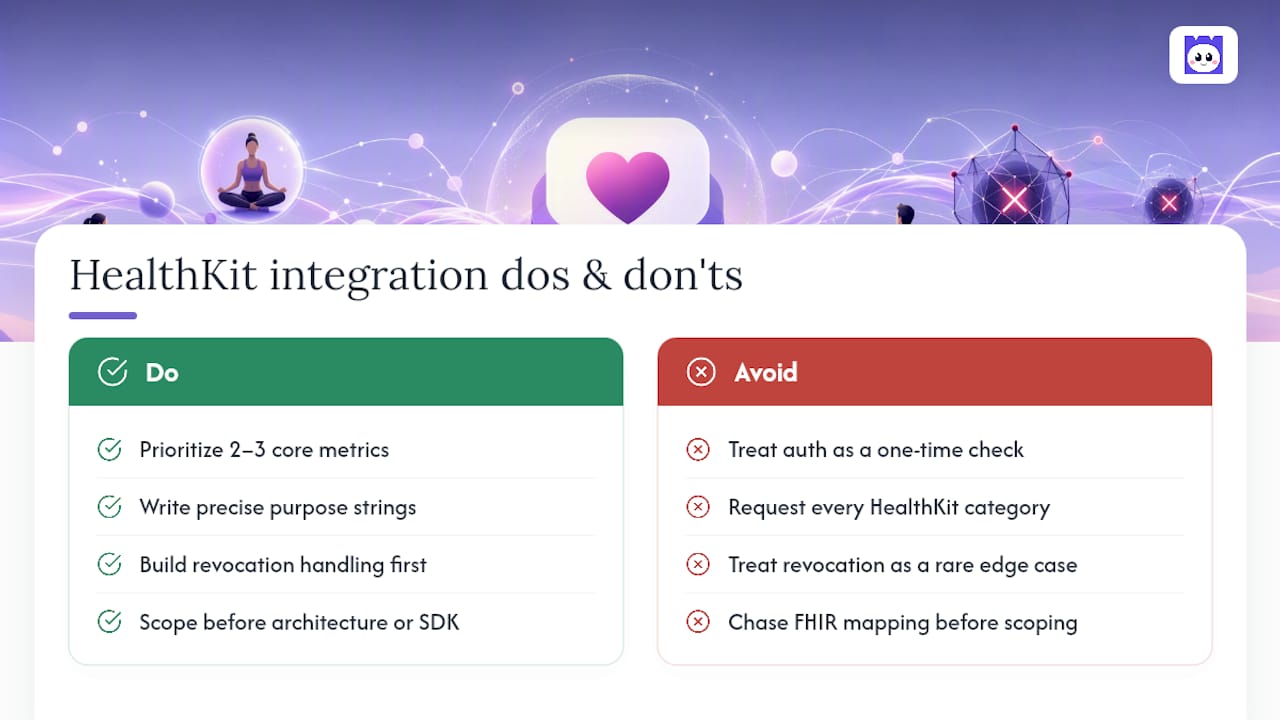
The other overrated instinct is chasing data type completeness. Requesting every HealthKit category you can think of doesn’t make your product more capable. It just multiplies the permission prompts standing between a new user and their first useful insight, and multiplies your normalisation surface area for types you’ll never actually use in a feature.
What should come first, before architecture diagrams or SDK selection: decide the two or three metrics your product cannot function without, write purpose strings that justify exactly those, and build your revocation handling before your happy-path sync. Everything else, including whether to bother with FHIR mapping at all, follows from that scoping decision rather than preceding it.
— Kerem
Skip the boilerplate: how Heala handles Apple Health for you
If you’re weighing whether to build this integration in-house versus evaluating a platform that already solved it, Heala centralises Apple Health alongside Fitbit, WHOOP, and Oura data inside one normalisation layer, cutting the backend branching that eats weeks of engineering time on a solo build.
Rather than writing separate handling for every wearable source, a centralized approach maps them all into one schema, the same principle covered above in the architecture section, already running in production across nutrition, workout, sleep, and recovery data. For a technical read on how that compares against building directly on Apple’s own frameworks, the Heala vs Apple Fitness and Apple Health comparison walks through the trade-offs in more detail, including how GPS and workout data flow through cardio tracking.
If you’re evaluating this for your own team or product, current plans and features sit on the Heala pricing page, including the Pro tier for teams wanting deeper integration coverage. Worth a look before you scope your own build.
Sources
- HealthKit | Apple Developer Documentation
- Apple Health API Integration | Open Wearables
- Health app privacy - Apple
FAQ
What apps integrate with Apple Health?
Fitness, nutrition, and sleep apps that request HealthKit permissions can integrate, including wearable-connected platforms like Heala, which centralises HealthKit alongside Fitbit, WHOOP, and Oura data. Any app must request explicit per-category access before reading or writing, as Apple’s HealthKit documentation specifies.
What devices integrate with Apple Health?
iPhone and Apple Watch are the primary devices, with HealthKit also available on visionOS and, through Catalyst, on Mac. Third-party wearables (Fitbit, WHOOP, Oura, various smart scales) sync into Apple Health via their own apps, which then makes that data available to any app the user authorises.
Is there an API for Apple Health?
HealthKit is the API, but it exists only on-device. There is no public cloud REST endpoint, so any server-side integration requires a native iOS component reading HealthKit locally and forwarding normalised data to your backend, a pattern common among third-party SDKs.
What Health app can I use on my Apple Watch?
Apple’s own Health app is the default hub on iPhone, syncing automatically with data recorded on Apple Watch. Users manage which categories sync and reorder source priority directly in the Health app’s Data Sources & Access settings, as Apple’s support documentation explains.
Recommended
Heala opens 1 October 2026
Free forever — Pro is optional.
Photo food logging, adaptive training, a morning recovery score and a 3D body twin, in one app.